

Setting Up an Ergonomic Workspace at Home
Back pain, neck strain, and tired eyes don't have to be part of working from home. Here's what actually matters for desk setup and why it works.
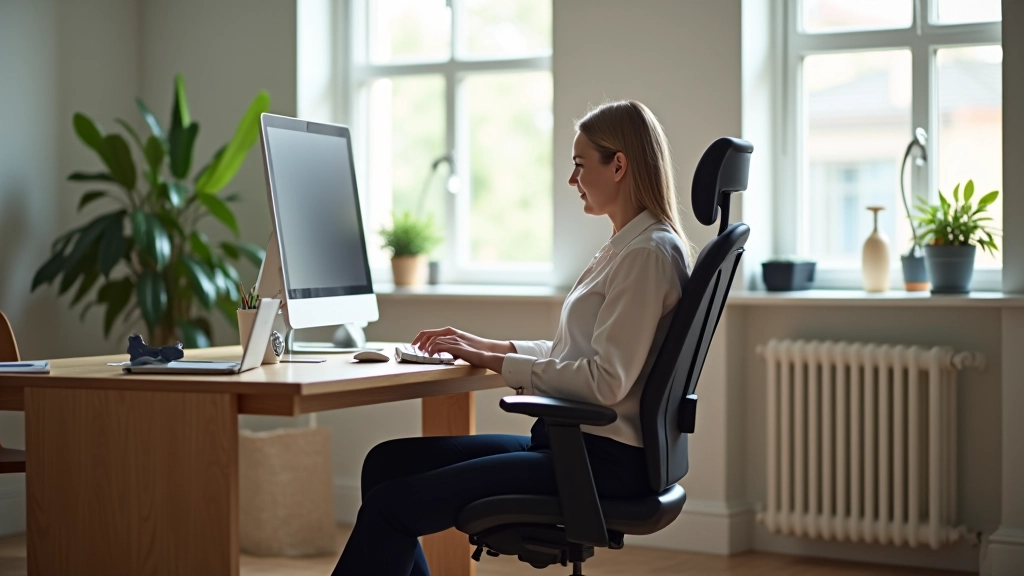
You're sitting more than ever. Working from home means your desk isn't just where you check emails — it's where you spend 7-8 hours daily. That's a lot of pressure on your body, and most people get it wrong without even realizing.
The thing is, you don't need expensive equipment or a complete overhaul. Good ergonomics is about alignment — getting your body in positions that don't fight gravity. When your setup matches your body's natural mechanics, pain stops being inevitable.
We've talked to people who've fixed their back problems, reduced eye strain, and actually enjoy their workday now. What changed? They understood the fundamentals and applied them consistently. That's what this guide covers.

Start With Your Chair — It's the Foundation
Your chair carries your entire upper body for hours. A bad chair isn't just uncomfortable — it's the root cause of most desk-related pain. But here's what people get wrong: an expensive chair doesn't guarantee good ergonomics.
What matters is adjustability. You need seat height that lets your feet sit flat on the floor with knees at 90 degrees. Your hips should be level with or slightly higher than your knees. Most people sit too low, which rounds their lower back and creates constant strain.
Armrests should support your elbows so your shoulders aren't constantly hunched. And backrest? It's not optional. A proper backrest supports the natural curve of your spine — that's what prevents hours from turning into days of accumulated pain.
If you're replacing your current chair, look for models with independent height and armrest adjustment. You'll spend more upfront, but it's an investment that pays dividends. Your spine will thank you.


Monitor Height and Distance: The Eye Strain Solution
Eye strain sneaks up on you. You don't notice it until you've been staring at a screen for hours and your eyes feel like sandpaper. The culprit is usually monitor position — too low, too high, or too close.
Here's the formula: your monitor should be about an arm's length away (roughly 50-70 centimeters). The top of the screen should be at or slightly below eye level when you're sitting naturally. If you're constantly looking down, you're straining your neck. Looking up is just as bad.
If you use a laptop, get a separate keyboard and mouse. Laptop screens are too low by default — your neck bends forward constantly, which creates tension that radiates into your shoulders. A monitor stand or laptop riser costs under 20 euros and transforms your setup.
The 20-20-20 rule helps too: every 20 minutes, look at something 20 feet away for 20 seconds. Your eyes relax, and you get a natural break from the constant focus.
Keyboard and Mouse: Small Details, Big Impact
Your hands spend more time on the keyboard than anywhere else. When it's positioned wrong, you develop tension in your wrists, forearms, and shoulders. You won't feel it immediately, but after weeks of repetitive positioning, it becomes painful.
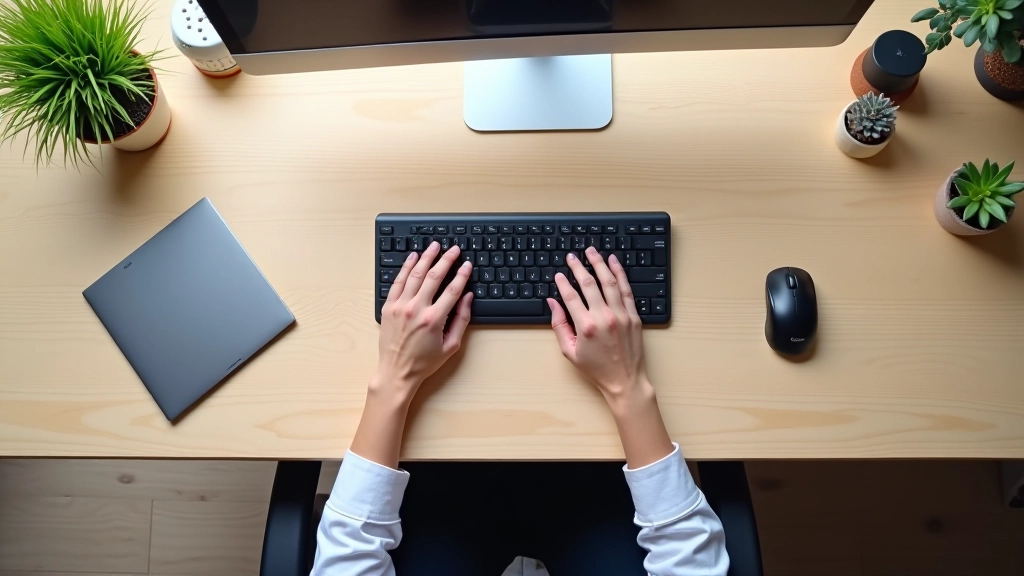
Your keyboard should be at elbow height when your arms hang naturally at your sides. Your wrists should be straight, not bent up or down. This is why typing with a laptop on your lap is terrible — your wrists angle upward constantly.
The mouse matters equally. It should be at the same height as your keyboard, positioned close to your body. Reaching too far forces your shoulder to compensate, creating that upper back tightness people attribute to "just aging." It's not aging — it's positioning.
Some people benefit from a wrist rest, but don't rest your wrists while typing. The rest is for breaks between work. While typing, your wrists should be neutral and mobile.
Lighting and Environment: The Forgotten Elements
You can have perfect chair and monitor positioning, but poor lighting ruins everything. Working in dim light forces your eyes to strain harder, and bright overhead lights create glare that makes you squint. Both lead to headaches and fatigue.
Natural light is ideal if you've got it. Position your desk perpendicular to windows, not facing them directly. That way, you get illumination without glare. If you rely on artificial light, use warm white (around 4000K color temperature) positioned to your side, not directly overhead.
Temperature and humidity matter too. A cold room causes muscles to tighten, and overly dry air irritates your eyes and throat. Keep your workspace around 21-23 degrees Celsius and humidity between 40-60%. Small adjustments create big differences in how you feel after hours of work.
And don't overlook desk space. Cluttered desks force awkward reaching and constant repositioning. Clear workspace reduces unnecessary movement and keeps your body in neutral positions longer.

Making Adjustments: Test and Refine
Perfect ergonomics doesn't happen overnight. Your body needs time to adapt, and you'll discover what feels right through experimentation. Don't expect all pain to disappear in a week — you're undoing months or years of poor positioning.
01
Adjust Your Chair First
Spend a full workday with seat height positioned so your feet rest flat on the floor with knees at 90 degrees. This is your anchor point for everything else.
02
Position Your Monitor
Once your chair is set, adjust monitor height and distance. You should look straight ahead or slightly down, never craning your neck. Make this change and give yourself a few days to notice the difference.
03
Fine-Tune Keyboard and Mouse
Adjust keyboard and mouse to match your new seated position. Your wrists should be neutral, not bent. Test this position for several days before making further changes.
04
Optimize Lighting
Adjust lighting to reduce glare and eye strain. Take breaks to assess how your eyes feel. Small lighting changes often have immediate positive effects.
Pain reduction takes time. If you've been sitting poorly for months, your muscles need 2-4 weeks to adapt to better positioning. Be patient with the process, and don't revert to old habits when discomfort emerges during the adjustment period.
The Real Truth About Workspace Ergonomics
Working from home doesn't have to mean pain and discomfort. You're not fighting against your body — you're just fighting against years of poor positioning habits. Once you understand how alignment works, the fixes become obvious.
Start with your chair. Add proper monitor positioning. Adjust your keyboard and mouse. Optimize your lighting. Do these four things consistently, and you'll notice changes within weeks. Your back will feel better, your neck won't ache, and your eyes won't burn by afternoon.
The investment? Mostly time spent adjusting what you already have. A better chair costs more, but it's optional. Good ergonomics is free if you're willing to think about how you're sitting.
If you're experiencing persistent pain despite these adjustments, talk to a healthcare professional. What we've covered handles 90% of office-related discomfort, but some issues need specialized attention.
Important Note
This article provides educational information about ergonomic workspace setup based on general ergonomic principles. It's not personalized medical advice. Everyone's body is different, and what works for one person might need adjustment for another. If you're experiencing chronic pain, numbness, or persistent discomfort, consult a healthcare professional or ergonomic specialist. They can assess your individual situation and provide recommendations tailored to your specific needs.
Related Articles